Integration Blueprint

Integration Flow Between New CRM and Old CRM

A vibrant walkthrough showing how every move in the new CRM keeps your legacy system instantly aligned—from serial creation to dispatch.

3

Integration Stages

Synchronized in real time

Stage 1
Serial Sync
Stage 2
Warehouse Inward
Stage 3
Dispatch Update

Three Stages. One Seamless Story.

Each stage represents a handshake between the new CRM and the legacy system, ensuring traceability from creation to delivery.

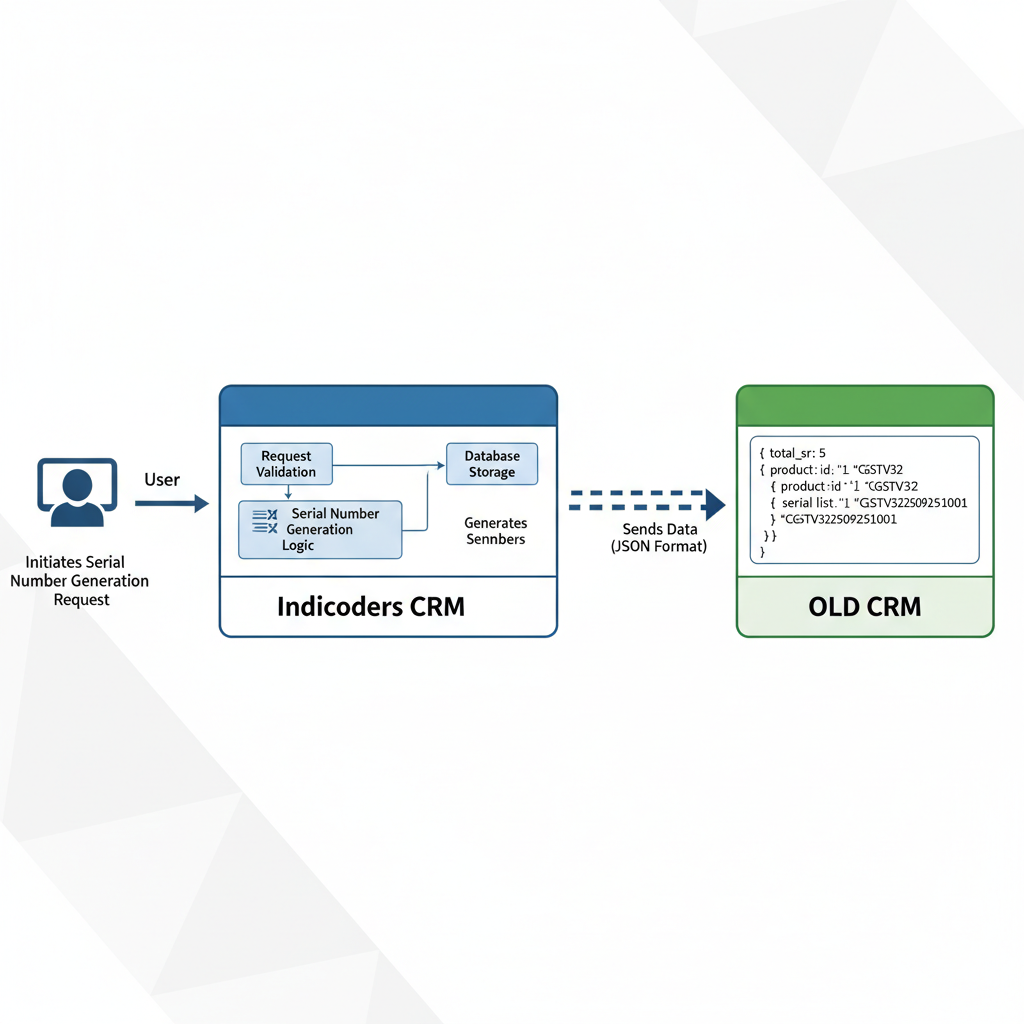
Stage 1 illustration
Stage 1

Serial Number Generation

As soon as new product serial numbers are generated in the new CRM, they are pushed to the old CRM and earmarked as orphaned inventory—ready for allocation.

API Payload Snapshot

{
  "total_sr": 5,
  "products": [
    {
      "product_id": "1",
      "product_code": "CGSTV32",
      "serial_list": [
        "CGSTV322509251001",
        "CGSTV322509251002"
      ]
    },
    {
      "product_id": "2",
      "product_code": "CGSTV36",
      "serial_list": [
        "CGSTV362509251001",
        "CGSTV362509251002",
        "CGSTV362509251003"
      ]
    }
  ]
}
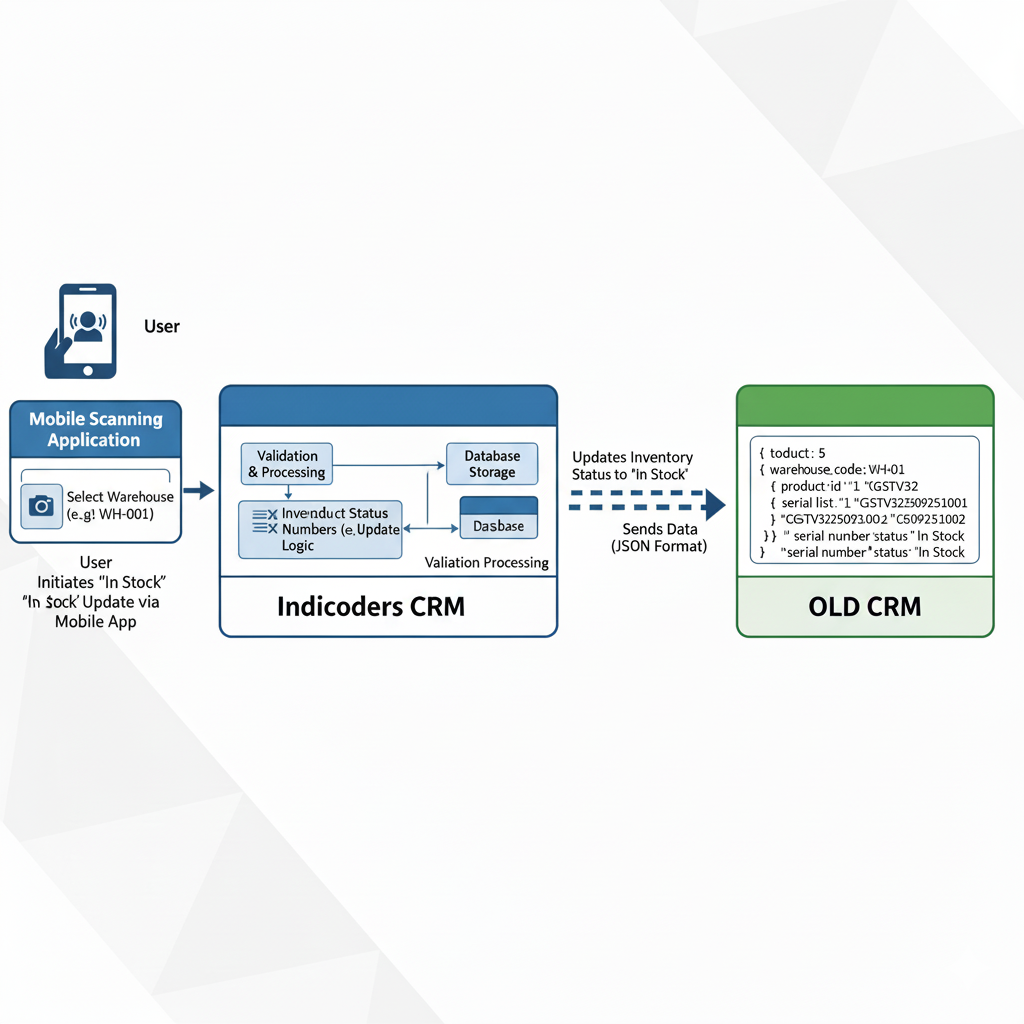
Stage 2

Inwarding into Warehouse/Store

Warehouse teams select their location, scan incoming products, and submit the inward request. Both CRMs instantly align inventory status to reflect the inward movement.

API Payload Snapshot

{
  "request_id": "INV-2025-09-25-0007",
  "warehouse_code": "WH001",
  "total_sr": 5,
  "products": [
    {
      "product_id": "1",
      "product_code": "CGSTV32",
      "serials": [
        { "sn": "CGSTV322509251001", "status": "IN_STOCK" },
        { "sn": "CGSTV322509251002", "status": "IN_STOCK" }
      ]
    },
    {
      "product_id": "2",
      "product_code": "CGSTV36",
      "serials": [
        { "sn": "CGSTV362509251001", "status": "IN_STOCK" },
        { "sn": "CGSTV362509251002", "status": "IN_STOCK" },
        { "sn": "CGSTV362509251003", "status": "IN_STOCK" }
      ]
    }
  ],
  "source": "mobile_app",
  "timestamp": "2025-09-25T17:00:00+05:30"
}
Stage 2 illustration
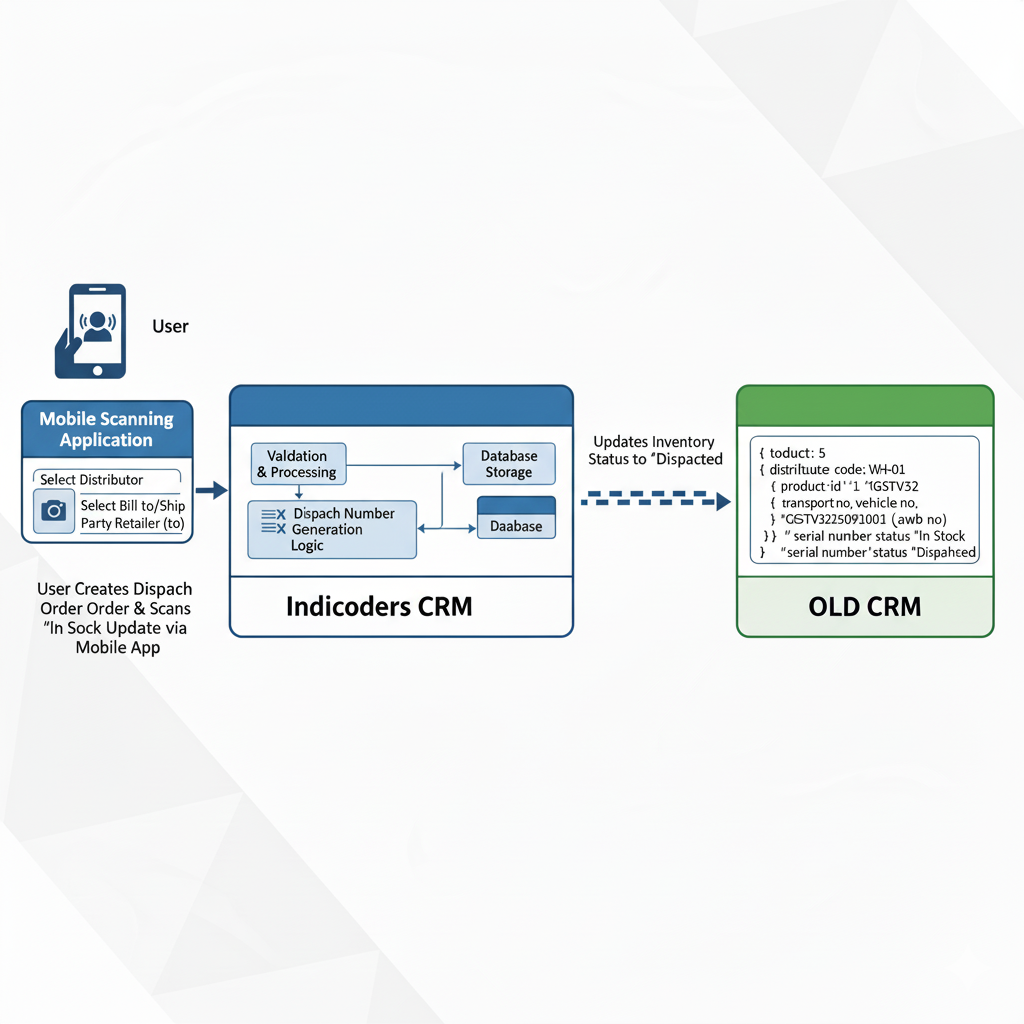
Stage 3 illustration
Stage 3

Dispatch to Distributor/Party

Dispatch teams capture destination, billing, and transport details. Once submitted, the dispatch order syncs with the old CRM, ensuring real-time visibility of movements and serial statuses.

API Payload Snapshot

{
  "request_id": "DO-2025-09-25-0012",
  "timestamp": "2025-09-25T17:20:00+05:30",
  "source": "mobile_app",
  "action": "DISPATCH",
  "dispatch_order": {
    "order_id": "INDI-DO-000312",
    "distributor_code": "D001",
    "party_code": "RET123",
    "bill_to": {
      "name": "ABC Retail Pvt Ltd",
      "code": "RET123",
      "gstin": "27AAACA0000A1Z5",
      "address": "2nd Floor, MG Road, Pune, MH 411001"
    },
    "ship_to": {
      "name": "ABC Retail Warehouse",
      "code": "RET123-WH01",
      "address": "Plot 9, Hinjewadi Phase 2, Pune, MH 411057"
    },
    "transport": {
      "transporter_name": "BlueDart Logistics",
      "mode": "ROAD",
      "vehicle_no": "MH12AB1234",
      "lr_no": "LR-9827345",
      "eway_bill_no": "3210-9988-7766",
      "dispatch_datetime": "2025-09-25T17:05:00+05:30",
      "remarks": "Handle with care"
    }
  },
  "total_sr": 5,
  "products": [
    {
      "product_id": "1",
      "product_code": "CGSTV32",
      "warehouse_code": "WH001",
      "serials": [
        { "sn": "CGSTV322509251001", "status": "DISPATCHED" },
        { "sn": "CGSTV322509251002", "status": "DISPATCHED" }
      ]
    },
    {
      "product_id": "2",
      "product_code": "CGSTV36",
      "warehouse_code": "WH001",
      "serials": [
        { "sn": "CGSTV362509251001", "status": "DISPATCHED" },
        { "sn": "CGSTV362509251002", "status": "DISPATCHED" },
        { "sn": "CGSTV362509251003", "status": "DISPATCHED" }
      ]
    }
  ]
}

In Summary

A tightly coupled integration ensures both CRMs stay perfectly aligned as inventory journeys from creation to delivery.

  • Stage 1 keeps both systems aligned when new serials are created.
  • Stage 2 ensures warehouse inwarding instantly updates stock status everywhere.
  • Stage 3 syncs dispatch details, customer info, and logistics in real time.

Why it matters

Every collaboration point between your teams becomes traceable, auditable, and transparent across both ecosystems.

Operational Benefits

  • Fewer reconciliation calls and manual updates.
  • Real-time visibility for sales, warehouse, and dispatch teams.
  • Cleaner audits with a single source of truth.
Customer Requested Changes

Service Team Enhancements

The service workflow now emphasizes part requests, serial validations, and richer complaint handling to meet frontline expectations.

⚡ In short
  • Complaint handling needs part requests, codes, validations, documents, and approvals.
  • Serial and model validations must cover complaints and returns.
  • Dashboard & return orders gain new part and serial options.

1. Dashboard

  • Add Part Request option in Service module.

2. All Complaints

  • Add Part Request option in Service.
  • Add Call Update option.
  • Add Technician code and Customer code.
  • Add Spare approval option.
  • Mandate Class A part serial numbers.
  • Require documents at part updation time.

3. Track Complaint

  • Add validation with serial number (currently missing).

4. Register Complaint

  • Add new call types: Pre-sale and Inspection.
  • Enforce serial nomenclature validation for existing complaints.
  • Add model validation city-wise or state-wise.

5. Return Orders

  • Add Part Serial Number option.